Showing posts with label Fitness. Show all posts

Wednesday, 1 February 2023

Dive into Firebase Tools: Empowering Technical Excellence in App Development.

In the realm of app development, Firebase has emerged as a go-to platform, providing a wide range of powerful tools that simplify the development process and enhance app functionality. In this blog post, we will take a technical deep dive into Firebase's tools and explore how they can be leveraged to build robust and efficient applications.

Refer the below link for complete sample code:-

Download Sample Code

Firebase Authentication:

Firebase Authentication allows developers to implement user authentication seamlessly. Under the hood, it handles the complexities of user management, password storage, and authentication flows. Developers can integrate Firebase Authentication into their apps using SDKs for various platforms, including Android, iOS, and the web. It supports email/password authentication, social authentication providers (such as Google, Facebook, and Twitter), phone number authentication, and custom authentication systems. Firebase Authentication also provides user identity and access management features, including user roles and permissions.

Firebase Realtime Database:

The Firebase Realtime Database is a NoSQL JSON database that enables real-time synchronization of data across connected clients. It offers offline capabilities, allowing users to access and modify data even when the device is offline. The Realtime Database employs a reactive programming model, triggering events whenever data changes. Developers can listen for these events and update the user interface accordingly. The database supports automatic data synchronization and conflict resolution, making it ideal for collaborative applications that require real-time updates, such as chat apps, collaborative editors, and live dashboards.

Cloud Firestore:

Cloud Firestore is a flexible, scalable, and highly available NoSQL document database. It provides seamless data synchronization, offline support, and powerful querying capabilities. Firestore organizes data in collections and documents, allowing developers to build hierarchical data structures. It supports atomic operations, enabling batch writes and complex transactions. Firestore offers robust security rules, allowing developers to define fine-grained access control. With Firestore's scalability and real-time capabilities, it is suitable for applications that require complex data querying, real-time collaboration, and offline data access.

Firebase Cloud Messaging:

Firebase Cloud Messaging (FCM) is a cross-platform messaging solution that enables developers to send notifications and messages to devices. FCM supports various message types, including notification messages and data messages. Notification messages display a notification on the device's system tray, while data messages allow developers to handle the message payload themselves. FCM provides high delivery rates, scalable message targeting, and support for topics and device groups. It also offers device registration and token management for efficient message routing.

Firebase Hosting:

Firebase Hosting is a fully-managed hosting service that provides developers with a secure and scalable platform for deploying web applications and static content. It integrates seamlessly with other Firebase services, allowing easy setup and configuration. Firebase Hosting leverages a global CDN to deliver content quickly to users worldwide. It supports custom domains, SSL/TLS encryption, and automatic HTTP/2 push. With Firebase Hosting, developers can easily deploy and update their web applications without worrying about infrastructure management.

Firebase Cloud Functions:

Firebase Cloud Functions is a serverless compute platform that allows developers to write and deploy server-side code in response to events triggered by Firebase services or HTTP requests. Developers can write functions in JavaScript or TypeScript and deploy them using Firebase CLI or through continuous integration (CI) pipelines. Cloud Functions can be used for a wide range of tasks, such as processing data, sending notifications, integrating with third-party APIs, and performing background tasks. It offers autoscaling, pay-per-use pricing, and integrates seamlessly with other Firebase services.

Firebase Performance Monitoring:

Firebase Performance Monitoring helps developers gain insights into their app's performance by collecting data on various performance metrics. It provides detailed reports on app startup time, screen rendering, network requests, and custom traces. Performance Monitoring offers integration with popular mobile development frameworks, including Android, iOS, and React Native. Developers can use Performance Monitoring to identify performance bottlenecks, optimize app performance, and deliver a smooth user experience.

Firebase Test Lab:

Firebase Test Lab is a cloud-based app-testing infrastructure that allows developers to test their Android and iOS apps on a wide range of real devices hosted in Google data centers. It offers automated testing capabilities, including compatibility testing, security testing, and performance testing. Developers can run tests on different device configurations, operating system versions, and network conditions. Firebase Test Lab helps ensure app quality, identify compatibility issues, and optimize app performance across various devices.

Conclusion:

Firebase's comprehensive suite of tools empowers developers to build feature-rich, scalable, and high-performance applications. By leveraging Firebase Authentication, Realtime Database, Cloud Firestore, Cloud Messaging, Hosting, Cloud Functions, Performance Monitoring, and Test Lab, developers can streamline the development process, enhance app functionality, and deliver exceptional user experiences. Whether you are building a small mobile app or a complex web application, Firebase offers the tools you need to succeed. 

Monday, 14 January 2019

HB Blog 163: Calculate Users Steps Using Google Fit Api.

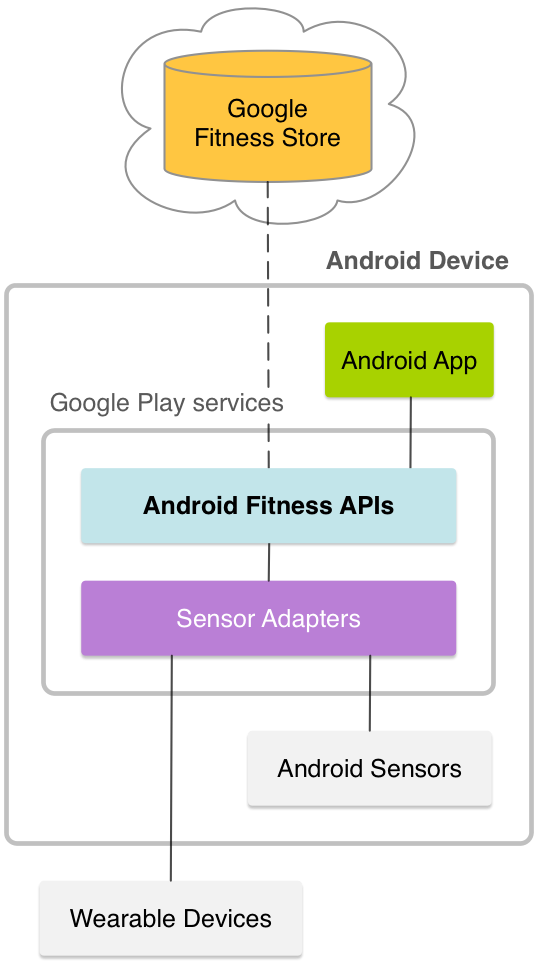
The Google Fit APIs for Android are part of Google Play services and consists of these APIs:

  • The Sensors API provides access to raw sensor data streams from sensors available on the Android device and from sensors available in companion devices, such as wearables.
  • The Recording API provides automated storage of fitness data using subscriptions. Google Fit stores fitness data of the specified types in the background and persists app subscriptions.

Google Fit diagram
Figure 1: Google Fit on Android.
  • The History API provides access to the fitness history and lets apps perform bulk operations, like inserting, deleting, and reading fitness data. Apps can also import batch data into Google Fit.
  • The Sessions API provides functionality to store fitness data with session metadata. Sessions represent a time interval during which users perform a fitness activity.
  • The Goals API provides a way to track the goals the user has set for their health and fitness progress.
  • The Bluetooth Low Energy API provides access to Bluetooth Low Energy sensors in Google Fit. This API enables your app to look for available BLE devices and to store data from them in the fitness store.
  • The Config API provides custom data types and additional settings for Google Fit. For more information, see Custom Data Types andDisconnect from Google Fit.

Google Fit also provides simple access to the daily total of a specified data type. Use the HistoryClient.readDailyTotal() method to retrieve the data type that you specify as of midnight of the current day in the device's current timezone. For example, pass in the TYPE_STEP_COUNT_DELTA data type to this method to retrieve the daily total steps.

Refer the below link for complete sample code:-

Download Sample Code

Have a look on few code snippets,

//MainActivity.java
  1
  2
  3
  4
  5
  6
  7
  8
  9
 10
 11
 12
 13
 14
 15
 16
 17
 18
 19
 20
 21
 22
 23
 24
 25
 26
 27
 28
 29
 30
 31
 32
 33
 34
 35
 36
 37
 38
 39
 40
 41
 42
 43
 44
 45
 46
 47
 48
 49
 50
 51
 52
 53
 54
 55
 56
 57
 58
 59
 60
 61
 62
 63
 64
 65
 66
 67
 68
 69
 70
 71
 72
 73
 74
 75
 76
 77
 78
 79
 80
 81
 82
 83
 84
 85
 86
 87
 88
 89
 90
 91
 92
 93
 94
 95
 96
 97
 98
 99
100
101
102
103
104
105
106
107
108
109
110
111
112
113
114
115
116
117
118
119
120
121
122
123
124
125
126
127
128
129
130
131
132
133
134
135
136
137
138
139
140
141
142
143
144
145
146
147
148
149
150
151
152
153
154
155
156
157
158
159
160
161
162
163
164
165
166
167
168
169
170
171
172
173
174
175
176
177
178
179
180
181
182
183
184
185
186
187
188
189
190
191
192
193
194
195
196
197
198
199
200
201
202
203
204
205
206
207
208
209
package com.harshalbenake.fitnesss;


import android.app.Notification;
import android.app.NotificationManager;
import android.app.PendingIntent;
import android.content.BroadcastReceiver;
import android.content.Context;
import android.content.Intent;
import android.content.IntentFilter;
import android.content.IntentSender;
import android.graphics.Bitmap;
import android.os.AsyncTask;
import android.os.Bundle;
import android.support.annotation.NonNull;
import android.support.v4.app.NotificationCompat;
import android.support.v4.app.NotificationManagerCompat;
import android.support.v4.content.LocalBroadcastManager;
import android.support.v7.app.AppCompatActivity;
import android.util.Log;
import android.widget.TextView;

import com.google.android.gms.common.ConnectionResult;
import com.google.android.gms.common.GooglePlayServicesUtil;
import com.google.android.gms.common.Scopes;
import com.google.android.gms.common.api.GoogleApiClient;
import com.google.android.gms.common.api.PendingResult;
import com.google.android.gms.common.api.Scope;
import com.google.android.gms.fitness.Fitness;
import com.google.android.gms.fitness.data.DataSet;
import com.google.android.gms.fitness.data.DataType;
import com.google.android.gms.fitness.data.Field;
import com.google.android.gms.fitness.result.DailyTotalResult;
import com.google.android.gms.location.ActivityRecognition;

import java.util.concurrent.TimeUnit;

public class MainActivity extends AppCompatActivity {

    public static final String TAG = "googlefit";
    private static final int REQUEST_OAUTH = 1000;
    private boolean authInProgress = false;
    private GoogleApiClient mClient = null;
    public TextView mtv_logs;

    @Override
    protected void onCreate(Bundle savedInstanceState) {
        super.onCreate(savedInstanceState);
        setContentView(R.layout.activity_main);
        mtv_logs = (TextView) findViewById(R.id.tv_logs);
        LocalBroadcastManager.getInstance(this).registerReceiver(mMessageReceiver,
                new IntentFilter(TAG));
        // Create the Google API Client
        mClient = new GoogleApiClient.Builder(this)
                .addApi(Fitness.HISTORY_API)
                .addApi(Fitness.CONFIG_API)
                .addApi(ActivityRecognition.API)
                .addScope(new Scope(Scopes.FITNESS_ACTIVITY_READ))
                .useDefaultAccount()
                .addConnectionCallbacks(
                        new GoogleApiClient.ConnectionCallbacks() {

                            @Override
                            public void onConnected(Bundle bundle) {
                                //Async To fetch steps
                                new FetchStepsAsync().execute();
                            }

                            @Override
                            public void onConnectionSuspended(int i) {
                                // If your connection to the sensor gets lost at some point,
                                // you'll be able to determine the reason and react to it here.
                                if (i == GoogleApiClient.ConnectionCallbacks.CAUSE_NETWORK_LOST) {
                                    Log.i(TAG, "Connection lost.  Cause: Network Lost.");
                                } else if (i == GoogleApiClient.ConnectionCallbacks.CAUSE_SERVICE_DISCONNECTED) {
                                    Log.i(TAG, "Connection lost.  Reason: Service Disconnected");
                                }
                            }
                        }
                ).addOnConnectionFailedListener(
                        new GoogleApiClient.OnConnectionFailedListener() {
                            @Override
                            public void onConnectionFailed(@NonNull ConnectionResult result) {
                                // Called whenever the API client fails to connect.

                                Log.i(TAG, "Connection failed. Cause: " + result.toString());
                                if (!result.hasResolution()) {
                                    // Show the localized error dialog
                                   GooglePlayServicesUtil.getErrorDialog(result.getErrorCode(),
                                            MainActivity.this, 0).show();
                                    return;
                                }
                                // The failure has a resolution. Resolve it.
                                // Called typically when the app is not yet authorized, and an
                                // authorization dialog is displayed to the user.
                                if (!authInProgress) {
                                    try {
                                        Log.i(TAG, "Attempting to resolve failed connection");
                                        authInProgress = true;
                                        result.startResolutionForResult(MainActivity.this, REQUEST_OAUTH);
                                    } catch (IntentSender.SendIntentException e) {
                                        Log.e(TAG,
                                                "Exception while starting resolution activity", e);
                                    }
                                }
                            }
                        }
                ).build();
        mClient.connect();
    }


    @Override
    protected void onDestroy() {
        // Unregister since the activity is about to be closed.
        LocalBroadcastManager.getInstance(this).unregisterReceiver(mMessageReceiver);
        super.onDestroy();
    }

    private class FetchStepsAsync extends AsyncTask<Object, Object, Long> {
        protected Long doInBackground(Object... params) {
            long total = 0;
            PendingResult<DailyTotalResult> result = Fitness.HistoryApi.readDailyTotal(mClient, DataType.TYPE_STEP_COUNT_DELTA);
            DailyTotalResult totalResult = result.await(30, TimeUnit.SECONDS);
            if (totalResult.getStatus().isSuccess()) {
                DataSet totalSet = totalResult.getTotal();
                if (totalSet != null) {
                    total = totalSet.isEmpty()
                            ? 0
                            : totalSet.getDataPoints().get(0).getValue(Field.FIELD_STEPS).asInt();
                }
            } else {
                Log.w(TAG, "There was a problem getting the step count.");
            }
            return total;
        }


        @Override
        protected void onPostExecute(Long aLong) {
            super.onPostExecute(aLong);
            //Total steps covered for that day
            Log.i(TAG, "Total steps: " + aLong);
            mtv_logs.setText(mtv_logs.getText().toString() + "Total steps: " + aLong);
            new FetchCalorieAsync().execute();
        }
    }

    private class FetchCalorieAsync extends AsyncTask<Object, Object, Float> {
        protected Float doInBackground(Object... params) {
            float total = 0;
            try {
                PendingResult<DailyTotalResult> result = Fitness.HistoryApi.readDailyTotal(mClient, DataType.TYPE_CALORIES_EXPENDED);
                DailyTotalResult totalResult = result.await(30, TimeUnit.SECONDS);
                if (totalResult.getStatus().isSuccess()) {
                    DataSet totalSet = totalResult.getTotal();
                    if (totalSet != null) {
                        total = totalSet.getDataPoints().get(0).getValue(Field.FIELD_CALORIES).asFloat();
                    }
                } else {
                    Log.w(TAG, "There was a problem getting the calories.");
                }
            } catch (Exception e) {
                e.printStackTrace();
            }
            return total;
        }

        @Override
        protected void onPostExecute(Float aLong) {
            super.onPostExecute(aLong);
            //Total calories burned for that day
            Log.i(TAG, "Total calories: " + aLong);
            mtv_logs.setText(mtv_logs.getText().toString() + "\n" + "Total calories: " + aLong);
            Intent intent = new Intent(MainActivity.this, ActivityRecognizedService.class );
            PendingIntent pendingIntent = PendingIntent.getService(MainActivity.this, 0, intent, PendingIntent.FLAG_UPDATE_CURRENT );
            ActivityRecognition.ActivityRecognitionApi.requestActivityUpdates(mClient, 10, pendingIntent );

        }
    }

    // Our handler for received Intents. This will be called whenever an Intent
// with an action named "custom-event-name" is broadcasted.
    private BroadcastReceiver mMessageReceiver = new BroadcastReceiver() {
        @Override
        public void onReceive(Context context, Intent intent) {
            // Get extra data included in the Intent
            String message = intent.getStringExtra("message");
            Log.d("receiver", "Got message: " + message);
            mtv_logs.setText(mtv_logs.getText().toString() + "\n" + message);
            displayNotification(mtv_logs.getText().toString());
        }
    };

    private void displayNotification(String strMessage) {
        NotificationCompat.Builder mBuilder =
                new NotificationCompat.Builder(MainActivity.this)
                        .setSmallIcon(R.drawable.ic_launcher_round)
                        .setContentTitle("Fitness")
                        .setContentText(strMessage)
                        .setAutoCancel(true)
                        .setDefaults(Notification.DEFAULT_SOUND)
                        .setPriority(Notification.PRIORITY_HIGH);
            mBuilder.setStyle(new NotificationCompat.BigTextStyle().bigText(strMessage));
         NotificationManager mNotificationManager=(NotificationManager) getSystemService(Context.NOTIFICATION_SERVICE);
        // my_notification_idallows you to update the displayNotification later on.
        mNotificationManager.notify(1, mBuilder.build());
    }
}

//ActivityRecognizedService.java
 1
 2
 3
 4
 5
 6
 7
 8
 9
10
11
12
13
14
15
16
17
18
19
20
21
22
23
24
25
26
27
28
29
30
31
32
33
34
35
36
37
38
39
40
41
42
43
44
45
46
47
48
49
50
51
52
53
54
55
56
57
58
59
60
61
62
63
64
65
66
67
68
69
70
71
72
73
74
75
76
77
78
79
80
81
82
83
84
85
86
87
88
89
90
91
92
93
94
95
96
97
package com.harshalbenake.fitnesss;

import android.app.IntentService;
import android.content.Intent;
import android.support.annotation.Nullable;
import android.support.v4.app.NotificationCompat;
import android.support.v4.app.NotificationManagerCompat;
import android.support.v4.content.LocalBroadcastManager;
import android.util.Log;

import com.google.android.gms.location.ActivityRecognitionResult;
import com.google.android.gms.location.DetectedActivity;

import java.util.List;

public class ActivityRecognizedService extends IntentService {

    private String strConfidence="";

    public String getStrConfidence() {
        return strConfidence;
    }

    public void setStrConfidence(String strConfidence) {
        this.strConfidence = strConfidence;
    }
    public ActivityRecognizedService() {
        super("ActivityRecognizedService");
    }

    public ActivityRecognizedService(String name) {
        super(name);
    }

    @Override
    protected void onHandleIntent(Intent intent) {
        if(ActivityRecognitionResult.hasResult(intent)) {
            ActivityRecognitionResult result = ActivityRecognitionResult.extractResult(intent);
            handleDetectedActivities( result.getProbableActivities() );
        }
    }

    @Override
    public int onStartCommand(@Nullable Intent intent, int flags, int startId) {
        //   mContext =   ((MainActivity) getApplicationContext());
        return super.onStartCommand(intent, flags, startId);
    }

    private void handleDetectedActivities(List<DetectedActivity> probableActivities) {
        for( DetectedActivity activity : probableActivities ) {
            System.out.println("activity.getConfidence() : "+activity.getConfidence() );
            setStrConfidence("activity.getConfidence() : "+activity.getConfidence());
            String strType="";
            switch( activity.getType() ) {
                case DetectedActivity.IN_VEHICLE: {
                    strType="IN_VEHICLE";
                    break;
                }
                case DetectedActivity.ON_BICYCLE: {
                    strType="ON_BICYCLE";
                    break;
                }
                case DetectedActivity.ON_FOOT: {
                    strType="ON_FOOT";
                    break;
                }
                case DetectedActivity.RUNNING: {
                    strType="RUNNING";
                    break;
                }
                case DetectedActivity.STILL: {
                    strType="STILL";
                    break;
                }
                case DetectedActivity.TILTING: {
                    strType="TILTING";
                    break;
                }
                case DetectedActivity.WALKING: {
                    strType="WALKING";
                    break;
                }
                case DetectedActivity.UNKNOWN: {
                    strType="UNKNOWN";
                    break;
                }
            }

            Intent intent = new Intent(MainActivity.TAG);
            // You can also include some extra data.
            intent.putExtra("message",strType+" : "+activity.getConfidence());
            LocalBroadcastManager.getInstance(this).sendBroadcast(intent);
        }
    }


}