Showing posts with label CardView. Show all posts

Saturday, 15 April 2017

HB Blog 133: Loader View Library For Android.

Now-a-days, people find animations and graphics pretty interesting. Mobile animations not only give an attractive user experience but, they also make the data loading process bearable for users. Users find progress bars, and loaders bit boring which make them loose interest in an application. There are many ways to handle these kinda problems.

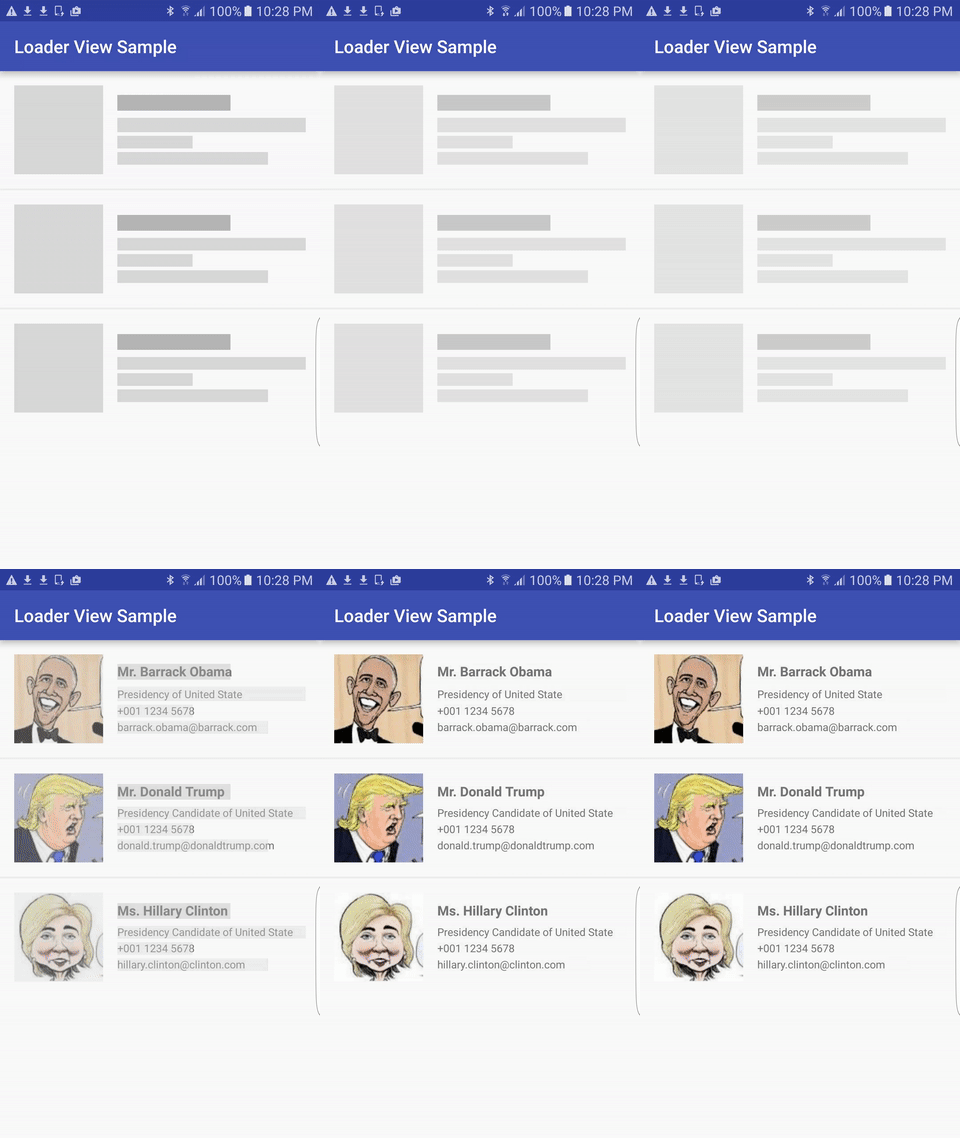
In these post, I will show how to use a library for providing animations while loading data without user getting bored. These library is been developed to provide both TextView and ImageView the ability to show shimmer (animation loader) before any text or image is shown. Useful when waiting for data to be loaded from the network.
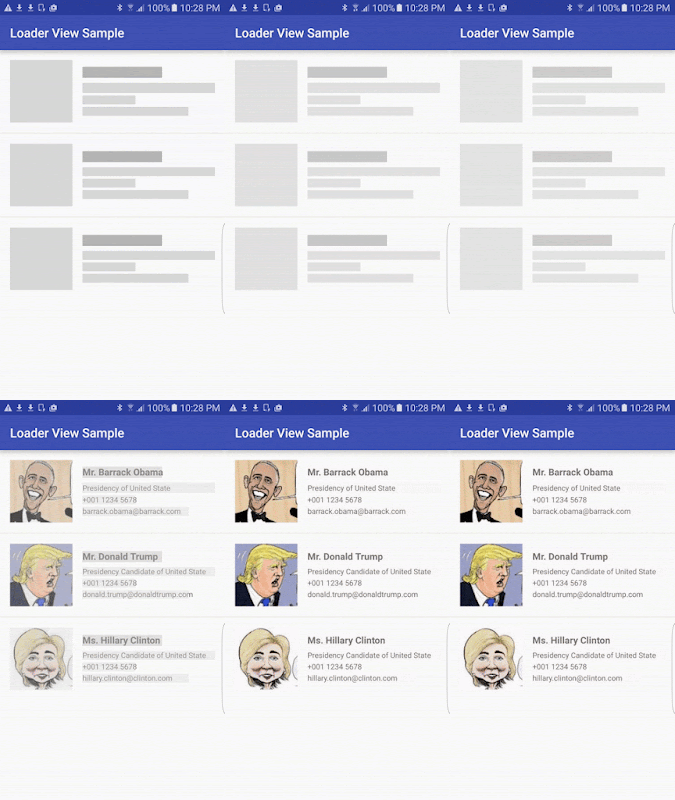
Refer the below link for complete sample code:-

Download Sample Code

Have a look on few code snippets,

//build.gradle
1
2
3
dependencies {
    compile 'com.elyeproj.libraries:loaderviewlibrary:1.3.0'
}

//activity_main.xml
 1
 2
 3
 4
 5
 6
 7
 8
 9
10
11
12
13
14
15
16
17
18
19
20
21
22
23
24
25
26
27
28
29
30
31
32
33
34
35
36
37
38
39
40
41
42
43
44
45
46
47
48
49
50
51
52
53
54
55
56
57
58
59
60
61
62
63
64
65
66
67
68
69
70
71
72
73
74
75
76
77
78
79
<?xml version="1.0" encoding="utf-8"?>
<LinearLayout xmlns:android="http://schemas.android.com/apk/res/android"
    xmlns:app="http://schemas.android.com/apk/res-auto"
    xmlns:tools="http://schemas.android.com/tools"
    android:layout_width="match_parent"
    android:layout_height="wrap_content"
    android:orientation="vertical">

    <RelativeLayout
        android:layout_width="match_parent"
        android:layout_margin="5dp"
        android:layout_height="wrap_content">

        <com.elyeproj.loaderviewlibrary.LoaderImageView
            android:id="@+id/image_icon"
            android:layout_width="100dp"
            android:layout_height="100dp"
            android:layout_marginEnd="16dp"
            android:layout_marginRight="16dp"
            app:use_gradient="true" />

        <LinearLayout
            android:id="@+id/container_text"
            android:layout_width="match_parent"
            android:layout_height="wrap_content"
            android:layout_centerVertical="true"
            android:layout_toEndOf="@id/image_icon"
            android:layout_toRightOf="@id/image_icon"
            android:orientation="vertical">

            <com.elyeproj.loaderviewlibrary.LoaderTextView
                android:id="@+id/txt_name"
                android:layout_width="match_parent"
                android:layout_height="wrap_content"
                android:textSize="@dimen/title_font_size"
                android:textStyle="bold"
                app:height_weight="0.8"
                app:use_gradient="true"
                app:width_weight="0.6" />

            <com.elyeproj.loaderviewlibrary.LoaderTextView
                android:id="@+id/txt_title"
                android:layout_width="match_parent"
                android:layout_height="wrap_content"
                android:layout_marginTop="8dp"
                android:textSize="@dimen/standard_font_size"
                app:height_weight="0.8"
                app:width_weight="1.0" />

            <com.elyeproj.loaderviewlibrary.LoaderTextView
                android:id="@+id/txt_phone"
                android:layout_width="match_parent"
                android:layout_height="wrap_content"
                android:layout_marginTop="4dp"
                android:textSize="@dimen/standard_font_size"
                app:height_weight="0.8"
                app:width_weight="0.4" />

            <com.elyeproj.loaderviewlibrary.LoaderTextView
                android:id="@+id/txt_email"
                android:layout_width="match_parent"
                android:layout_height="wrap_content"
                android:layout_marginTop="4dp"
                android:textSize="@dimen/standard_font_size"
                app:height_weight="0.8"
                app:width_weight="0.9" />

        </LinearLayout>

    </RelativeLayout>

    <Button
        android:id="@+id/btn_reset"
        android:layout_width="match_parent"
        android:layout_height="wrap_content"
        android:layout_margin="@dimen/activity_vertical_margin"
        android:onClick="resetLoader"
        android:text="Reset" />
</LinearLayout>

//MainActivity.java
 1
 2
 3
 4
 5
 6
 7
 8
 9
10
11
12
13
14
15
16
17
18
19
20
21
22
23
24
25
26
27
28
29
30
31
32
33
34
35
36
37
38
39
40
41
42
43
44
45
46
47
48
49
50
51
52
53
54
55
56
57
58
59
60
61
62
63
64
65
66
67
68
69
70
71
72
73
package com.example.harshalbenake.loaderviewanimation;

import android.os.AsyncTask;
import android.os.Bundle;
import android.support.v7.app.AppCompatActivity;
import android.view.View;
import android.widget.ImageView;
import android.widget.TextView;

import com.elyeproj.loaderviewlibrary.LoaderImageView;
import com.elyeproj.loaderviewlibrary.LoaderTextView;

public class MainActivity extends AppCompatActivity {

    private int WAIT_DURATION = 5000;
    private DummyWait dummyWait;

    @Override
    protected void onCreate(Bundle savedInstanceState) {
        super.onCreate(savedInstanceState);
        setContentView(R.layout.activity_main);
        loadData();
    }

    private void loadData() {
        if (dummyWait != null) {
            dummyWait.cancel(true);
        }
        dummyWait = new DummyWait();
        dummyWait.execute();
    }

    private void postLoadData() {
        ((TextView)findViewById(R.id.txt_name)).setText("Harshal Benake");
        ((TextView)findViewById(R.id.txt_title)).setText("Android Dev");
        ((TextView)findViewById(R.id.txt_phone)).setText("7588871488");
        ((TextView)findViewById(R.id.txt_email)).setText("harshalbenake@gmail.com");
        ((ImageView)findViewById(R.id.image_icon)).setImageResource(R.drawable.ic_launcher);
    }

    public void resetLoader(View view) {
        ((LoaderTextView)findViewById(R.id.txt_name)).resetLoader();
        ((LoaderTextView)findViewById(R.id.txt_title)).resetLoader();
        ((LoaderTextView)findViewById(R.id.txt_phone)).resetLoader();
        ((LoaderTextView)findViewById(R.id.txt_email)).resetLoader();
        ((LoaderImageView)findViewById(R.id.image_icon)).resetLoader();
        loadData();
    }

    class DummyWait extends AsyncTask<Void, Void, Void> {
        @Override
        protected void onPreExecute() {
            super.onPreExecute();
        }

        @Override
        protected Void doInBackground(Void... params) {
            try {
                Thread.sleep(WAIT_DURATION);
            } catch (InterruptedException e) {
                e.printStackTrace();
            }
            return null;
        }

        @Override
        protected void onPostExecute(Void result) {
            super.onPostExecute(result);
            postLoadData();
        }
    }

}

Wednesday, 15 March 2017

HB Blog 131: Material Design For Registration - Login Module.

Registration and login has been most important and very first step in a mobile application. There are various ways through which we can achieve these functionality. Not only functionality wise but also applications look and feel is very important. While Android and other mobile application users increasing, we are moving more over towards UI/UX interfaces. Android has been using material design in various patterns.

In these tutorial, I will show how to use material design for login and registration screens.

We need single page application which uses proper animations for screen transitions and provide easy to use and understand way. Using these sample code use can easily design registration-login module.


Refer the below link for complete sample code:-

Download Sample Code

Have a look on few code snippets,

//MainActivity.java 
 1
 2
 3
 4
 5
 6
 7
 8
 9
10
11
12
13
14
15
16
17
18
19
20
21
22
23
24
25
26
27
28
29
30
31
32
33
34
35
36
37
38
39
40
41
42
43
44
45
46
47
48
49
50
51
52
53
54
55
56
57
58
59
60
61
62
63
64
65
66
import android.app.ActivityOptions;
import android.content.Intent;
import android.os.Build;
import android.os.Bundle;
import android.support.design.widget.FloatingActionButton;
import android.support.v4.app.ActivityOptionsCompat;
import android.support.v7.app.AppCompatActivity;
import android.support.v7.widget.CardView;
import android.transition.Explode;
import android.view.View;
import android.widget.Button;
import android.widget.EditText;

import butterknife.ButterKnife;
import butterknife.InjectView;
import butterknife.OnClick;

public class MainActivity extends AppCompatActivity {

    @InjectView(R.id.et_username)
    EditText etUsername;
    @InjectView(R.id.et_password)
    EditText etPassword;
    @InjectView(R.id.bt_go)
    Button btGo;
    @InjectView(R.id.cv)
    CardView cv;
    @InjectView(R.id.fab)
    FloatingActionButton fab;

    @Override
    protected void onCreate(Bundle savedInstanceState) {
        super.onCreate(savedInstanceState);
        setContentView(R.layout.activity_main);
        ButterKnife.inject(this);

    }

    @OnClick({R.id.bt_go, R.id.fab})
    public void onClick(View view) {
        switch (view.getId()) {
            case R.id.fab:
                getWindow().setExitTransition(null);
                getWindow().setEnterTransition(null);

                if (Build.VERSION.SDK_INT >= Build.VERSION_CODES.LOLLIPOP) {
                    ActivityOptions options =
                            ActivityOptions.makeSceneTransitionAnimation(this, fab, fab.getTransitionName());
                    startActivity(new Intent(this, RegisterActivity.class), options.toBundle());
                } else {
                    startActivity(new Intent(this, RegisterActivity.class));
                }
                break;
            case R.id.bt_go:
                Explode explode = new Explode();
                explode.setDuration(500);

                getWindow().setExitTransition(explode);
                getWindow().setEnterTransition(explode);
                ActivityOptionsCompat oc2 = ActivityOptionsCompat.makeSceneTransitionAnimation(this);
                Intent i2 = new Intent(this,LoginSuccessActivity.class);
                startActivity(i2, oc2.toBundle());
                break;
        }
    }
}

//RegisterActivity.java 
  1
  2
  3
  4
  5
  6
  7
  8
  9
 10
 11
 12
 13
 14
 15
 16
 17
 18
 19
 20
 21
 22
 23
 24
 25
 26
 27
 28
 29
 30
 31
 32
 33
 34
 35
 36
 37
 38
 39
 40
 41
 42
 43
 44
 45
 46
 47
 48
 49
 50
 51
 52
 53
 54
 55
 56
 57
 58
 59
 60
 61
 62
 63
 64
 65
 66
 67
 68
 69
 70
 71
 72
 73
 74
 75
 76
 77
 78
 79
 80
 81
 82
 83
 84
 85
 86
 87
 88
 89
 90
 91
 92
 93
 94
 95
 96
 97
 98
 99
100
101
102
103
104
105
106
107
108
109
110
111
112
113
114
115
116
117
118
119
120
import android.animation.Animator;
import android.animation.AnimatorListenerAdapter;
import android.graphics.Color;
import android.os.Build;
import android.os.Bundle;
import android.support.design.widget.FloatingActionButton;
import android.support.v7.app.AppCompatActivity;
import android.support.v7.widget.CardView;
import android.transition.Transition;
import android.transition.TransitionInflater;
import android.view.View;
import android.view.ViewAnimationUtils;
import android.view.animation.AccelerateInterpolator;

import butterknife.ButterKnife;
import butterknife.InjectView;

public class RegisterActivity extends AppCompatActivity {

    @InjectView(R.id.fab)
    FloatingActionButton fab;
    @InjectView(R.id.cv_add)
    CardView cvAdd;

    @Override
    protected void onCreate(Bundle savedInstanceState) {
        super.onCreate(savedInstanceState);
        setContentView(R.layout.activity_register);
        ButterKnife.inject(this);

        if (Build.VERSION.SDK_INT >= Build.VERSION_CODES.LOLLIPOP) {
            ShowEnterAnimation();
        }
        fab.setOnClickListener(new View.OnClickListener() {
            @Override
            public void onClick(View v) {
                animateRevealClose();
            }
        });
    }

    private void ShowEnterAnimation() {
        Transition transition = TransitionInflater.from(this).inflateTransition(R.transition.fabtransition);
        getWindow().setSharedElementEnterTransition(transition);

        transition.addListener(new Transition.TransitionListener() {
            @Override
            public void onTransitionStart(Transition transition) {
                cvAdd.setVisibility(View.GONE);
            }

            @Override
            public void onTransitionEnd(Transition transition) {
                transition.removeListener(this);
                animateRevealShow();
            }

            @Override
            public void onTransitionCancel(Transition transition) {

            }

            @Override
            public void onTransitionPause(Transition transition) {

            }

            @Override
            public void onTransitionResume(Transition transition) {

            }


        });
    }

    public void animateRevealShow() {
        Animator mAnimator = ViewAnimationUtils.createCircularReveal(cvAdd, cvAdd.getWidth()/2,0, fab.getWidth() / 2, cvAdd.getHeight());
        mAnimator.setDuration(500);
        mAnimator.setInterpolator(new AccelerateInterpolator());
        mAnimator.addListener(new AnimatorListenerAdapter() {
            @Override
            public void onAnimationEnd(Animator animation) {
                super.onAnimationEnd(animation);
            }

            @Override
            public void onAnimationStart(Animator animation) {
                cvAdd.setVisibility(View.VISIBLE);
                super.onAnimationStart(animation);
            }
        });
        mAnimator.start();
    }

    public void animateRevealClose() {
        Animator mAnimator = ViewAnimationUtils.createCircularReveal(cvAdd,cvAdd.getWidth()/2,0, cvAdd.getHeight(), fab.getWidth() / 2);
        mAnimator.setDuration(500);
        mAnimator.setInterpolator(new AccelerateInterpolator());
        mAnimator.addListener(new AnimatorListenerAdapter() {
            @Override
            public void onAnimationEnd(Animator animation) {
                cvAdd.setVisibility(View.INVISIBLE);
                super.onAnimationEnd(animation);
                fab.setImageResource(R.drawable.plus);
                RegisterActivity.super.onBackPressed();
            }

            @Override
            public void onAnimationStart(Animator animation) {
                super.onAnimationStart(animation);
            }
        });
        mAnimator.start();
    }
    @Override
    public void onBackPressed() {
        animateRevealClose();
    }
}

//activity_main.xml 
  1
  2
  3
  4
  5
  6
  7
  8
  9
 10
 11
 12
 13
 14
 15
 16
 17
 18
 19
 20
 21
 22
 23
 24
 25
 26
 27
 28
 29
 30
 31
 32
 33
 34
 35
 36
 37
 38
 39
 40
 41
 42
 43
 44
 45
 46
 47
 48
 49
 50
 51
 52
 53
 54
 55
 56
 57
 58
 59
 60
 61
 62
 63
 64
 65
 66
 67
 68
 69
 70
 71
 72
 73
 74
 75
 76
 77
 78
 79
 80
 81
 82
 83
 84
 85
 86
 87
 88
 89
 90
 91
 92
 93
 94
 95
 96
 97
 98
 99
100
101
102
103
104
105
106
107
108
109
110
111
112
113
114
115
116
117
118
119
120
121
122
123
124
125
126
127
128
129
130
131
132
133
134
<?xml version="1.0" encoding="utf-8"?>
<RelativeLayout xmlns:android="http://schemas.android.com/apk/res/android"
    xmlns:app="http://schemas.android.com/apk/res-auto"
    xmlns:tools="http://schemas.android.com/tools"
    android:layout_width="match_parent"
    android:layout_height="match_parent"
    android:background="@drawable/bg"
    tools:context="cn.fanrunqi.materiallogin.MainActivity">

    <android.support.v7.widget.CardView
        android:layout_width="300dp"
        android:layout_height="300dp"
        app:cardCornerRadius="6dp"
        app:cardElevation="3dp"
        app:cardUseCompatPadding="true"
        android:layout_centerInParent="true"
        android:id="@+id/cv">
        <LinearLayout
            android:layout_width="match_parent"
            android:layout_height="match_parent"
            android:orientation="vertical"
            >
        <RelativeLayout
            android:layout_marginTop="10dp"
            android:layout_width="match_parent"
            android:layout_height="45dp">
            <View
                android:layout_alignParentStart="true"
                android:layout_width="8dp"
                android:layout_height="match_parent"
                android:background="#2fa881"
                />
            <TextView
                android:layout_centerVertical="true"
                android:layout_width="wrap_content"
                android:layout_height="wrap_content"
                android:layout_marginStart="50dp"
                android:text="@string/login"
                android:textColor="#FFCC00"
                android:textSize="18sp"
                android:textStyle="bold"
                />
        </RelativeLayout>
        <LinearLayout
            android:layout_marginTop="10dp"
            android:paddingStart="50dp"
            android:paddingEnd="30dp"
            android:orientation="horizontal"
            android:layout_width="match_parent"
            android:layout_height="50dp">
            <android.support.design.widget.TextInputLayout
                android:textColorHint="#c5c5c5"
                android:layout_width="match_parent"
                android:layout_height="wrap_content">
                <EditText
                    android:textSize="13sp"
                    android:hint="@string/Username"
                    android:textColor="#2fa881"
                    android:id="@+id/et_username"
                    android:layout_width="match_parent"
                    android:layout_height="wrap_content"
                    android:inputType="textPersonName"
                    android:background="@drawable/selector_bg_edit"
                    android:textCursorDrawable="@drawable/bg_input_cursor"
                    android:paddingBottom="2dp"
                    />
            </android.support.design.widget.TextInputLayout>
        </LinearLayout>
            <LinearLayout
                android:paddingStart="50dp"
                android:paddingEnd="30dp"
                android:orientation="horizontal"
                android:layout_width="match_parent"
                android:layout_height="50dp">
                <android.support.design.widget.TextInputLayout
                    android:textColorHint="#c5c5c5"
                    android:layout_width="match_parent"
                    android:layout_height="wrap_content">
                    <EditText
                        android:textSize="13sp"
                        android:hint="@string/Password"
                        android:textColor="#2fa881"
                        android:id="@+id/et_password"
                        android:layout_width="match_parent"
                        android:layout_height="wrap_content"
                        android:inputType="textPassword"
                        android:background="@drawable/selector_bg_edit"
                        android:textCursorDrawable="@drawable/bg_input_cursor"
                        android:paddingBottom="2dp"
                        />
                </android.support.design.widget.TextInputLayout>
            </LinearLayout>
            <RelativeLayout
                android:layout_marginTop="25dp"
                android:gravity="center"
                android:layout_width="match_parent"
                android:layout_height="60dp">
                <Button
                    android:id="@+id/bt_go"
                    android:background="@drawable/bt_shape"
                    android:stateListAnimator="@drawable/state_list_animator_z"
                    android:layout_width="150dp"
                    android:layout_height="50dp"
                    android:text="@string/go"
                    android:textColor="#d3d3d3"
                    >
                </Button>
            </RelativeLayout>
            <TextView
                android:layout_marginTop="5dp"
                android:layout_gravity="center_horizontal"
                android:textColor="#9a9a9a"
                android:textSize="12sp"
                android:layout_width="wrap_content"
                android:layout_height="wrap_content"
                android:text="@string/forgot_your_password"
                />
        </LinearLayout>
        </android.support.v7.widget.CardView>

    <android.support.design.widget.FloatingActionButton
        android:id="@+id/fab"
        android:layout_width="wrap_content"
        android:layout_height="wrap_content"
        app:fabSize="normal"
        android:src="@drawable/plus"
        android:transitionName="loginFab"
        android:layout_alignTop="@id/cv"
        android:layout_marginTop="25dp"
        android:layout_alignEnd="@id/cv"
        android:layout_marginEnd="-20dp"
        />

</RelativeLayout>

//activity_register.xml 
  1
  2
  3
  4
  5
  6
  7
  8
  9
 10
 11
 12
 13
 14
 15
 16
 17
 18
 19
 20
 21
 22
 23
 24
 25
 26
 27
 28
 29
 30
 31
 32
 33
 34
 35
 36
 37
 38
 39
 40
 41
 42
 43
 44
 45
 46
 47
 48
 49
 50
 51
 52
 53
 54
 55
 56
 57
 58
 59
 60
 61
 62
 63
 64
 65
 66
 67
 68
 69
 70
 71
 72
 73
 74
 75
 76
 77
 78
 79
 80
 81
 82
 83
 84
 85
 86
 87
 88
 89
 90
 91
 92
 93
 94
 95
 96
 97
 98
 99
100
101
102
103
104
105
106
107
108
109
110
111
112
113
114
115
116
117
118
119
120
121
122
123
124
125
126
127
128
129
130
131
132
133
<?xml version="1.0" encoding="utf-8"?>
<RelativeLayout xmlns:android="http://schemas.android.com/apk/res/android"
    xmlns:app="http://schemas.android.com/apk/res-auto"
    xmlns:tools="http://schemas.android.com/tools"
    android:layout_width="match_parent"
    android:layout_height="match_parent"
    android:background="@drawable/bg">

    <android.support.v7.widget.CardView
        android:layout_width="300dp"
        android:layout_height="300dp"
        app:cardCornerRadius="6dp"
        app:cardElevation="3dp"
        app:cardUseCompatPadding="true"
        android:layout_centerInParent="true"
        android:id="@+id/cv">
        <LinearLayout
            android:layout_width="match_parent"
            android:layout_height="match_parent"
            android:orientation="vertical"
            >
        <RelativeLayout
            android:layout_marginTop="10dp"
            android:layout_width="match_parent"
            android:layout_height="45dp">
            <View
                android:layout_alignParentStart="true"
                android:layout_width="8dp"
                android:layout_height="match_parent"
                android:background="#2fa881"
                />
            <TextView
                android:layout_centerVertical="true"
                android:layout_width="wrap_content"
                android:layout_height="wrap_content"
                android:layout_marginStart="50dp"
                android:text="@string/login"
                android:textColor="#FFCC00"
                android:textSize="18sp"
                android:textStyle="bold"
                />
        </RelativeLayout>
        <LinearLayout
            android:layout_marginTop="10dp"
            android:paddingStart="50dp"
            android:paddingEnd="30dp"
            android:orientation="horizontal"
            android:layout_width="match_parent"
            android:layout_height="50dp">
            <android.support.design.widget.TextInputLayout
                android:textColorHint="#c5c5c5"
                android:layout_width="match_parent"
                android:layout_height="wrap_content">
                <EditText
                    android:textSize="13sp"
                    android:hint="@string/Username"
                    android:textColor="#2fa881"
                    android:id="@+id/et_username"
                    android:layout_width="match_parent"
                    android:layout_height="wrap_content"
                    android:inputType="textPersonName"
                    android:background="@drawable/selector_bg_edit"
                    android:textCursorDrawable="@drawable/bg_input_cursor"
                    android:paddingBottom="2dp"
                    />
            </android.support.design.widget.TextInputLayout>
        </LinearLayout>
            <LinearLayout
                android:paddingStart="50dp"
                android:paddingEnd="30dp"
                android:orientation="horizontal"
                android:layout_width="match_parent"
                android:layout_height="50dp">
                <android.support.design.widget.TextInputLayout
                    android:textColorHint="#c5c5c5"
                    android:layout_width="match_parent"
                    android:layout_height="wrap_content">
                    <EditText
                        android:textSize="13sp"
                        android:hint="@string/Password"
                        android:textColor="#2fa881"
                        android:id="@+id/et_password"
                        android:layout_width="match_parent"
                        android:layout_height="wrap_content"
                        android:inputType="textPassword"
                        android:background="@drawable/selector_bg_edit"
                        android:textCursorDrawable="@drawable/bg_input_cursor"
                        android:paddingBottom="2dp"
                        />
                </android.support.design.widget.TextInputLayout>
            </LinearLayout>
            <RelativeLayout
                android:layout_marginTop="25dp"
                android:gravity="center"
                android:layout_width="match_parent"
                android:layout_height="60dp">
                <Button
                    android:id="@+id/bt_go"
                    android:background="@drawable/bt_shape"
                    android:stateListAnimator="@drawable/state_list_animator_z"
                    android:layout_width="150dp"
                    android:layout_height="50dp"
                    android:text="@string/go"
                    android:textColor="#d3d3d3"
                    >
                </Button>
            </RelativeLayout>
            <TextView
                android:layout_marginTop="5dp"
                android:layout_gravity="center_horizontal"
                android:textColor="#9a9a9a"
                android:textSize="12sp"
                android:layout_width="wrap_content"
                android:layout_height="wrap_content"
                android:text="@string/forgot_your_password"
                />
        </LinearLayout>
        </android.support.v7.widget.CardView>

    <android.support.design.widget.FloatingActionButton
        android:id="@+id/fab"
        android:layout_width="wrap_content"
        android:layout_height="wrap_content"
        app:fabSize="normal"
        android:src="@drawable/plus"
        android:transitionName="loginFab"
        android:layout_alignTop="@id/cv"
        android:layout_marginTop="25dp"
        android:layout_alignEnd="@id/cv"
        android:layout_marginEnd="-20dp"
        />

</RelativeLayout>

Monday, 27 July 2015

HB Blog 85: Creating Material Design Listing Using RecyclerView And CardView.

In this post, I will show how to use card view and recyclerview for listing data items. To create complex lists and cards with material design styles in your apps, you can use the RecyclerView and CardView widgets.

RecyclerView:- A flexible view for providing a limited window into a large data set. 
The RecyclerView widget is a more advanced and flexible version of ListView. This widget is a container for displaying large data sets that can be scrolled very efficiently by maintaining a limited number of views. To use the RecyclerView widget, you have to specify an adapter and a layout manager. To create an adapter, extend the RecyclerView.Adapter class. The details of the implementation depend on the specifics of your dataset and the type of views. A layout manager positions item views inside a RecyclerView and determines when to reuse item views that are no longer visible to the user. To reuse (or recycle) a view, a layout manager may ask the adapter to replace the contents of the view with a different element from the dataset.
CardView:- A FrameLayout with a rounded corner background and shadow. 
The CardView uses elevation property in lollipop version for shadows and falls back to a custom shadow implementation on older platforms. To create a card with a shadow, use the card_view:cardElevation attribute. CardView uses real elevation and dynamic shadows on Android 5.0 (API level 21) and above and falls back to a programmatic shadow implementation on earlier versions.

The RecyclerView and CardView widgets are part of the v7 Support Libraries. To use these widgets in your project, add these Gradle dependencies to your app's module:
dependencies {
    compile 'com.android.support:cardview-v7:21.0.+'
    compile 'com.android.support:recyclerview-v7:21.0.+'
}


Refer the below link for complete sample code:-
Download Sample Code
Download Apk File
Have a look on few code snippets,

RecycleViewActivity.java
 1
 2
 3
 4
 5
 6
 7
 8
 9
10
11
12
13
14
15
16
17
18
19
20
21
22
23
24
25
26
27
28
29
30
31
32
33
34
35
36
37
38
39
40
41
42
43
44
45
46
47
48
49
50
51
52
53
54
55
56
57
58
59
60
61
62
63
64
65
66
67
68
69
70
71
72
73
74
75
76
77
78
79
80
81
82
83
84
85
86
87
88
89
90
91
import android.app.Activity;
import android.os.Bundle;
import android.support.v7.widget.LinearLayoutManager;
import android.support.v7.widget.RecyclerView;
import android.view.LayoutInflater;
import android.view.View;
import android.view.ViewGroup;
import android.widget.TextView;


/**
 * Created by harshalbenake on 02/06/15.
 */
public class RecycleViewActivity extends Activity {
     RecyclerView mRecyclerView;
     RecyclerView.Adapter mAdapter;
     RecyclerView.LayoutManager mLayoutManager;
     String[] myDataset;
    @Override
    protected void onCreate(Bundle savedInstanceState) {
        super.onCreate(savedInstanceState);
        setContentView(R.layout.main_recycle_view);

        mRecyclerView = (RecyclerView) findViewById(R.id.my_recycler_view);
        // use this setting to improve performance if you know that changes
        // in content do not change the layout size of the RecyclerView
        mRecyclerView.setHasFixedSize(true);
        // use a linear layout manager
        mLayoutManager = new LinearLayoutManager(RecycleViewActivity.this);
        mRecyclerView.setLayoutManager(mLayoutManager);

        myDataset = new String[101];
        for (int i = 0; i < 101; i++)
        {
            myDataset[i] = String.format("Harshal Benake: "+i, i);
        }

        // specify an adapter
        mAdapter = new MyAdapter(myDataset);
        mRecyclerView.setAdapter(mAdapter);

    }

    public class MyAdapter extends RecyclerView.Adapter<MyAdapter.ViewHolder> {
        private String[] mDataset;

        // Provide a reference to the views for each data item
        // Complex data items may need more than one view per item, and
        // you provide access to all the views for a data item in a view holder
        public class ViewHolder extends RecyclerView.ViewHolder {
            // each data item is just a string in this case
            public TextView mTextView;
            public ViewHolder(View v) {
                super(v);
                mTextView=(TextView)v.findViewById(R.id.row_textView);
            }
        }

        // Provide a suitable constructor (depends on the kind of dataset)
        public MyAdapter(String[] myDataset) {
            mDataset = myDataset;
        }

        // Create new views (invoked by the layout manager)
        @Override
        public MyAdapter.ViewHolder onCreateViewHolder(ViewGroup parent,
                                                       int viewType) {
            // create a new view
            View view = LayoutInflater.from(parent.getContext()).inflate(R.layout.row_item, parent, false);

            // set the view's size, margins, paddings and layout parameters
            ViewHolder viewHolder = new ViewHolder(view);
            return viewHolder;
        }

        // Replace the contents of a view (invoked by the layout manager)
        @Override
        public void onBindViewHolder(ViewHolder holder, int position) {
            // - get element from your dataset at this position
            // - replace the contents of the view with that element
            holder.mTextView.setText(mDataset[position]);

        }

        // Return the size of your dataset (invoked by the layout manager)
        @Override
        public int getItemCount() {
            return mDataset.length;
        }
    }
}

main_recycle_view.xml
 1
 2
 3
 4
 5
 6
 7
 8
 9
10
11
<?xml version="1.0" encoding="utf-8"?>
<LinearLayout xmlns:android="http://schemas.android.com/apk/res/android"
    android:orientation="vertical" android:layout_width="match_parent"
    android:layout_height="match_parent">
    <!-- A RecyclerView with some commonly used attributes -->
    <android.support.v7.widget.RecyclerView
        android:id="@+id/my_recycler_view"
        android:scrollbars="none"
        android:layout_width="match_parent"
        android:layout_height="match_parent"/>
</LinearLayout>

row_item.xml
 1
 2
 3
 4
 5
 6
 7
 8
 9
10
11
12
13
14
15
16
<android.support.v7.widget.CardView xmlns:android="http://schemas.android.com/apk/res/android"
    xmlns:card_view="http://schemas.android.com/apk/res-auto"
    android:id="@+id/card_view"
    android:layout_width="match_parent"
    android:layout_height="wrap_content"
    android:layout_margin="10dp"
    card_view:cardCornerRadius="4dp">

    <TextView
        android:id="@+id/row_textView"
        android:layout_width="wrap_content"
        android:layout_height="wrap_content"
        android:layout_margin="10dp"
        android:elevation="2dp"
        android:text="New Text" />
</android.support.v7.widget.CardView>

build.gradle
 1
 2
 3
 4
 5
 6
 7
 8
 9
10
11
12
13
14
15
16
17
18
19
20
21
22
23
24
25
26
27
28
apply plugin: 'com.android.application'

android {
    compileSdkVersion 21
    buildToolsVersion "22.0.1"

    defaultConfig {
        applicationId "com.lollipopsupport_as"
        minSdkVersion 15
        targetSdkVersion 21
        versionCode 1
        versionName "1.0"
    }
    buildTypes {
        release {
            minifyEnabled false
            proguardFiles getDefaultProguardFile('proguard-android.txt'), 'proguard-rules.pro'
        }
    }
}

dependencies {
    compile fileTree(dir: 'libs', include: ['*.jar'])
    compile 'com.android.support:appcompat-v7:21.0.+'
    compile 'com.android.support:cardview-v7:21.0.+'
    compile 'com.android.support:recyclerview-v7:21.0.+'

}