Showing posts with label Windows. Show all posts

Friday, 1 December 2017

HB Blog 149: Cross Platform Development.

In computing, cross-platform software (also multi-platform software or platform-independent software) is computer software that is implemented on multiple computing platforms. Cross-platform software may be divided into two types; one requires individual building or compilation for each platform that it supports, and the other one can be directly run on any platform without special preparation. Cross-platform programming is the practice of actively writing software that will work on more than one platform.
There are a number of tools which are available to help facilitate the process of cross-platform programming:
  1.     8th: A cross-platform development language, which utilizes Juce as its GUI layer. The platforms it currently supports are: Android, iOS, Windows, macOS, Linux and Raspberry Pi.
  2.     Anant Computing: A mobile application platform that works in all Indian languages, including their keyboards, which is also supports AppWallet and Native performance inside all operating systems.
  3.     Appcelerator: It helps in building native apps by deploying just a single JavaScript code base. It provides your web content in a native application, ensuring your code is not wrapped around a web container unlike few other such solutions.
  4.     AppearIQ: A framework that supports the workflow of app development and deployment in an enterprise environment. Natively developed containers present hardware features of the mobile devices or tablets through an API to HTML5 code thus facilitating the development of mobile apps that run on different platforms.
  5.     Cairo: A free software library used to provide a vector graphics-based, device-independent API. It is designed to provide primitives for 2-dimensional drawing across a number of different backends. Cairo is written in C and has bindings for many programming languages.
  6.     Cocos2d: An open source toolkit and game engine for developing 2D and simple 3D cross-platform games and applications.
  7.     Delphi: A cross platform IDE, which uses Pascal language for Development. Currently it supports Android, iOS, Windows, macOS.
  8.     Ecere SDK: A cross platform GUI & 2D/3D graphics toolkit and IDE, written in eC and with support for additional languages such as C and Python. Currently it supports Linux, FreeBSD, Windows, Android, macOS and the Web through Emscripten or Binaryen (WebAssembly)
  9.     Eclipse: An open source cross-platform development environment. Implemented in Java with a configurable architecture which supports many tools for software development. Add-ons are available for several languages, including Java and C++.
  10.     FLTK: Another open source cross platform toolkit, but more lightweight because it restricts itself to the GUI.
  11.     fpGUI: An open source widget toolkit that is completely implemented in Object Pascal. It currently supports Linux, Windows and a bit of Windows CE.
  12.     GeneXus: A Windows rapid software development solution for cross-platform application creation and deployment based on knowledge representation and supporting C#, COBOL, Java including Android and BlackBerry smart devices, Objective-C for Apple mobile devices, RPG, Ruby, Visual Basic, and Visual FoxPro.
  13.     GLBasic: A BASIC dialoect and compiler that generates C++ code. It includes cross compilers for many platforms and supports numerous platform (Windows, Mac, Linux, Android,iOS and some exotic handhelds).
  14.     GTK+: An open source widget toolkit for Unix-like systems with X11 and Microsoft Windows.
  15.     Haxe: An open source cross-platform language.
  16.     Juce: An application framework written in C++, used to write native software on numerous systems (Microsoft Windows, POSIX, macOS), with no change to the code.
  17.     Lazarus: A programming environment for the FreePascal Compiler. It supports the creation of self-standing graphical and console applications and runs on Linux, MacOSX, iOS, Android, WinCE, Windows and WEB.
  18.     Max/MSP: A visual programming language that encapsulates platform-independent code with a platform-specific runtime environment into applications for macOS and Windows.
  19.     MechDome: A cross-platform Android runtime. It allows unmodified Android apps to run natively on iOS and macOS
  20.     MonoCross: An open-source model-view-controller design pattern where the model and controller are shared cross-platform but the view is platform-specific.
  21.     Mono: An open-source cross-platform version of Microsoft .NET (a framework for applications and programming languages)
  22.     MoSync: An open-source SDK for mobile platform app development in the C++ family
  23.     Mozilla application framework: An open source platform for building macOS, Windows and Linux applications
  24.     OpenGL: A cross-platform 3D graphics library.
  25.     PhoneGap: It enables software programmers to build applications for mobile devices using CSS3, HTML5, and JavaScript instead of relying on platform-specific APIs like those in Android, iOS, or Windows Phone.
  26.     PureBasic: A proprietary cross-platform language and IDE for building macOS, Windows and Linux applications
  27.     Qt: An application framework and widget toolkit for Unix-like systems with X11, Microsoft Windows, macOS, and other systems—available under both open source and proprietary licenses.
  28.     Simple and Fast Multimedia Library: A multimedia C++ API that provides low and high level access to graphics, input, audio, etc.
  29.     Simple DirectMedia Layer: An open-source cross-platform multimedia library written in C that creates an abstraction over various platforms’ graphics, sound, and input APIs. It runs on many operating systems including Linux, Windows and macOS and is aimed at games and multimedia applications.
  30.     Smartface: A cross platform native app development tool to create mobile applications for Android and iOS, using WYSIWYG design editor with JavaScript code editor.
  31.     Tcl/Tk
  32.     Ultimate++: A C++ cross-platform rapid application development framework focused on programmers productivity. It includes a set of libraries (GUI, SQL, etc..), and an integrated development environment. It supports Windows and Unix-like OS-s. The U++ competes with popular scripting languages while preserving C/C++ runtime characteristics. It has its own integrated development environment, TheIDE, which features BLITZ-build technology to speedup C++ rebuilds up to 4 times.
  33.     Unity: Another cross-platform SDK which uses Unity Engine.
  34.     Unreal: A cross-platform SDK which uses Unreal Engine.
  35.     V-Play Engine: V-Play is a cross-platform development SDK based on the popular Qt framework. V-Play apps and games are created within Qt Creator.
  36.     WaveMaker: A Cross-platform low-code development tool to create responsive web and hybrid mobile (Android & iOS) applications.
  37.     WinDev: Integrated Development Environment for Windows, Linux, .Net and Java (also with support for Internet and Intranet)
  38.     wxWidgets: An open source widget toolkit that is also an application framework.[14] It runs on Unix-like systems with X11, Microsoft Windows and macOS. It permits applications written to use it to run on all of the systems that it supports, if the application does not use any operating system-specific programming in addition to it.
  39.     Xamrin: With a C#-shared codebase, developers can use Xamarin tools to write native Android, iOS, and Windows apps with native user interfaces and share code across multiple platforms, including Windows and macOS. 
  40.     Xojo: A RAD IDE developed by Xojo, Inc. that uses an object-oriented programming language to create desktop, web and iOS apps. Xojo makes native, compiled desktop apps for macOS, Windows, Linux and Raspberry Pi. It creates compiled web apps that can be run as standalone servers or through CGI. And it recently added the ability to create native iOS apps.

Thursday, 1 June 2017

HB Blog 137: Android "O" Supports New Emoji With Unicode 10 Standard.

Emoji are ideograms and smileys used in electronic messages and Web pages. They are used much like emoticons and exist in various genres, including facial expressions, common objects, places and types of weather, and animals. The first emoji was created in 1999 in Japan by Shigetaka Kurita, who wanted to provide users with a way to communicate through images. Originating on Japanese mobile phones in the late 1990s, emoji have become increasingly popular worldwide since their international inclusion in Apple's iPhone, which was followed by similar adoption by Android and other mobile operating systems.
Apple was looking to expand its market in Japan. People had been using these characters to provide context to their communication, so Apple added a hidden feature in the iOS5 update. Suddenly, yellow faces and poop icons became a part of our lexicon.

Android "O" an upcoming release of the Android mobile operating system, supports new emoji that will be included in the Unicode 10 standard. A new emoji font was also introduced, which notably redesigns its face figures to use a traditional circular shape, as opposed to the "blob" design that was introduced on Android "KitKat".

One Emoji to Rule Them All Before an emoji can become an emoji it must be approved by the Unicode Consortium. Approval process typically takes 1 to 2 years.

Unicode Consortium Submission Process:-
1. Submit a proposal
2. Provide justification for its creation by proving a need.

Argue that the icon is already popular online and frequently searched. • Show that a currently existing family of emoji is missing this pivotal group member. • Prove that there is no other way to express this idea with an existing emoji combination.

Emoji communication problems(With Great Power Comes Great Responsibility) :-
Research has shown that emojis are often misunderstood. In some cases, this is related to how the actual emoji design is interpreted by the viewer, in other cases the emoji that was sent, was not shown in the same way at the receiving side.
The difference between these two problems is, that the first relates to the cultural or contextual interpretation of the smiley. When the author picks a smiley, the author thinks about the smiley in a certain way, but the same smiley may not trigger the same thoughts with the receiver. See also Models of communication.
The second problem is technological. When an author of a message picks a smiley from a list of smiley faces, this smiley is encoded in some way during the transmission, and if the author and the reader do not use the same software or operating system for their devices, the reader's device may visualize the same smiley in a different way.

Small changes to a smiley's look may completely alter its perceived meaning with the receiver.

...Keep Smiling 😊😊😊

Wednesday, 1 March 2017

HB Blog 130: How To Scan Network With Nmap GUI.

Nmap is popular network scanner software that can actively probe a particular host or a network to infer in-depth information about them. Nmap can conduct host discovery, service detection, OS version identification, port scanning, network stack fingerprinting, etc. It will help you to discover hosts, protocols, open ports, services and its configuration and vulnerabilities on networks. While Nmap itself is a command-line utility, you can run it along with its GUI front-end called Zenmap. Network Mapper is an Android frontend for well known Nmap scanner. Frontend will help you to download and install Nmap as well as use it. Frontend supports all known Android architectures: arm, mips and x86. Nmap binaries are transferred using HTTPS by default.

In this tutorial, I will describe how to scan particular hosts or networks by using Nmap GUI.
The following screenshot shows the main window of Zenmap.
Scan Particular Host(s):-
Using Zenmap interface, you can probe a particular host. Fill in the IP address or host name of a destination host in "Target" field, and choose a desired scan profile from "Profile" drop down menu. Then, click on "Scan" button. For multiple hosts, you can specify them in a comma-separated list.
To check the detailed system information of a particular host after scanning, highlight a host in the left panel, and click on "Host Details" tab on the right panel.
To view available services and open ports of a host, click on "Ports / Hosts" tab.
Scan an Entire Network:-
Zenmap can also probe an entire local network by specifying an address prefix (e.g., 192.168.1.0/24) in the "Target" field.
Once network scanning is completed, you can view the topology of discovered hosts by clicking on "Topology" tab.
To view a list of available services, click on "Services" button on the left panel. You can see a list of all discovered services and their associated hosts, as shown below.

Sunday, 18 October 2015

HB Blog 98: Go Programming Language - Google's Open Source Project.

Go, also commonly referred to as golang, is a programming language, an open source project developed at Google. It is expressive, concise, clean, and efficient. Its concurrency mechanisms make it easy to write programs that get the most out of multicore and networked machines, while its novel type system enables flexible and modular program construction. Go compiles quickly to machine code yet has the convenience of garbage collection and the power of run-time reflection. It's a fast, statically typed, compiled language that feels like a dynamically typed, interpreted language.
Go was born out of frustration with existing languages and environments for systems programming. Programming had become too difficult and the choice of languages was partly to blame. One had to choose either efficient compilation, efficient execution, or ease of programming; all three were not available in the same mainstream language. Programmers who could were choosing ease over safety and efficiency by moving to dynamically typed languages such as Python and JavaScript rather than C++ or, to a lesser extent, Java.

Go is an attempt to combine the ease of programming of an interpreted, dynamically typed language with the efficiency and safety of a statically typed, compiled language. It also aims to be modern, with support for networked and multicore computing. Finally, it is intended to be fast: it should take at most a few seconds to build a large executable on a single computer. To meet these goals required addressing a number of linguistic issues: an expressive but lightweight type system; concurrency and garbage collection; rigid dependency specification; and so on. These cannot be addressed well by libraries or tools; a new language was called for.

It is a statically-typed language with syntax loosely derived from that of C, adding garbage collection, type safety, some dynamic-typing capabilities, additional built-in types such as variable-length arrays and key-value maps, and a large standard library. Although it borrows ideas from existing languages, it has unusual properties that make effective Go programs different in character from programs written in its relatives. A straightforward translation of a C++ or Java program into Go is unlikely to produce a satisfactory result—Java programs are written in Java, not Go. On the other hand, thinking about the problem from a Go perspective could produce a successful but quite different program. In other words, to write Go well, it's important to understand its properties and idioms. It's also important to know the established conventions for programming in Go, such as naming, formatting, program construction, and so on, so that programs you write will be easy for other Go programmers to understand.
Refer below link to download the Go distribution:-
https://golang.org/dl/

Project structure:-
 Go code must be kept inside a workspace. A workspace is a directory hierarchy with three directories at its root:
    src contains Go source files organized into packages (one package per directory),
    pkg contains package objects, and
    bin contains executable commands.

The go tool builds source packages and installs the resulting binaries to the pkg and bin directories.
The src subdirectory typically contains multiple version control repositories (such as for Git or Mercurial) that track the development of one or more source packages.

To give an idea of how a workspace looks in practice, here's an example:

bin/
    hello                          # command executable
    outyet                         # command executable
pkg/
    linux_amd64/
        github.com/golang/example/
            stringutil.a           # package object
src/
    github.com/golang/example/
        .git/                      # Git repository metadata
    hello/
        hello.go               # command source
    outyet/
        main.go                # command source
        main_test.go           # test source
    stringutil/
        reverse.go             # package source
        reverse_test.go        # test source


This workspace contains one repository (example) comprising two commands (hello and outyet) and one library (stringutil).
A typical workspace would contain many source repositories containing many packages and commands.
Commands and libraries are built from different kinds of source packages.

Check that Go is installed correctly by building a simple program, as follows.
Create a file named hello.go and put the following program in it:
package main
import "fmt"
func main() {
    fmt.Printf("hello, world\n")
}

Then run it with the go tool:
$ go run hello.go
hello, world

If you see the "hello, world" message then your Go installation is working.

An interactive introduction to Go in three sections. The first section covers basic syntax and data structures; the second discusses methods and interfaces; and the third introduces Go's concurrency primitives. Each section concludes with a few exercises so you can practice what you've learned.
Refer below link to download the Go distribution:-
https://tour.golang.org/

Friday, 4 September 2015

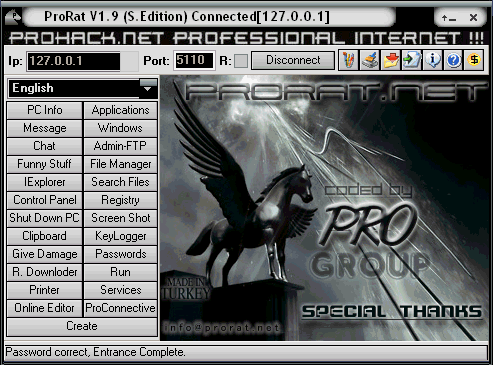
HB Blog 92: ProRAT - Remote Administration Tool.

ProRat is a Remote Administration Tool made by PRO Group. It was written in C programming language and its capable to work with all windows operating systems. It is made for remoting your own computers from other computers. It is a Microsoft Windows based backdoor trojan horse, more commonly known as a RAT (Remote Administration Tool). As with other trojan horses it uses a client and server. It opens a port on the computer which allows the client to perform numerous operations on the server (the machine being controlled).
Features of ProRAT:-
ProRat allows many malicious actions on the victim's machine. Some of its abilities include:
    Logging keystrokes
    Full control over files
    Drive formatting
    Open/close CD tray
    Hide taskbar, desktop, and start button
    Writing on-screen
    Movement of cursor
    Feed the cat
    Take screenshots
    View system information
    View webcam
    Download & run files
    Password Protect your bound server from being used by anyone else
It also has a server creator which features that allow it to be undetected by antivirus and firewall software, and also allow it to stealthily run in the background.

How to remotely control computers using ProRAT: -
  1. Download ProRat. Once it is downloaded right click on the folder and choose to extract it, antivirus will detect it as trojan but it is a false positive detection. Open up the program.
  2. Next create the actual Trojan file. Click on Create and choose Create ProRat Server.
  3. Next put in your IP address so the server could connect to you. If you don’t know your IP address click on the little arrow to have it filled in for you automatically. Next put in your e-mail so that when and if a victim gets infected it will send you a message.
  4. Click on the General Settings button to continue. Choose the server port the program will connect through, the password you will be asked to enter when the victim is infected and you wish to connect with them, and the victim name. You can see ProRat has the ability to disable the windows firewall and hide itself from being displayed in the task manager.
  5. Click on the Bind with File button to continue. Here you will have the option to bind the trojan server file with another file. Remember a trojan can only be executed if a human runs it. So by binding it with a legitimate file like a text document or a game, the chances of someone clicking it go up. Check the bind option and select a file to bind it to.
  6. Click on the Server Extensions button to continue. Choose what kind of server file togenerate. Mostly exe’s looks suspicious so it would be smart to change it. Click on Server Icon to continue. Here you will choose an icon for your server file to have. The icons help mask what the file actually is.
  7. Finally click on Create Server to, you guessed it, create the server file.
  8. Once the trojan runs on victims computer the attacker would then get a message telling him that victim was infected. He would then connect to computer by typing in my IP address, port and clicking Connect. He will be asked for the password that he made when he created the server. Once he types it in, he will be connected to victims computer and have full controlover it.
How to protect/secure computers from ProRAT:-
  1. First thing you need do is reboot the computer in Safe Mode with Networking to avoid Trojan Prorat from loading at start-up.
  2. Remove all media such as floppy drive, cd, dvd, and USB devices. Then, restart the computer.
  3. Once Windows is running under Safe Mode with Networking, open your antivirus program and download the most recent update. This method ensures that your antivirus program can detect even newer variants of Trojan Prorat.
  4. Once updating is finished, run a full system scan. After the scan, delete all infected items. If unable to clean or delete, better place the threat in quarantine.
  5. In future, try not to click or open unknown files or links.

Sunday, 17 May 2015

HB Blog 73: Inside The Mobile Phone.

A mobile phone is an electronic device used for mobile telecommunications over a cellular network of specialized base stations known as cell sites. A cell phone offers full Duplex Communication and transfer the link when the user moves from one cell to another. As the phone user moves from one cell area to another, the system automatically commands the mobile phone and a cell site with a stronger signal, to switch on to a new frequency in order to keep the link.
Mobile phone is primarily designed for Voice communication. In addition to the standard voice function, new generation mobile phones support many additional services, and accessories, such as SMS for text messaging, email, packet switching for access to the Internet, gaming, Bluetooth, camera with video recorder and MMS for sending and receiving photos and video, MP3 player, radio and GPS. 

Signal Frequency in Cell Phone
The cellular system is the division of an area into small cells.
This allows extensive frequency reuse across that area, so that many people can use cell phones simultaneously. Cellular networks has a number of advantages like increased capacity, reduced power usage, larger coverage area, reduced interference from other signals etc.

FDMA and CDMA Systems
Frequency Division Multiple Access (FDMA) and Code Division Multiple Access (CDMA) were developed to distinguish signals from several different transmitters. In FDMA, the transmitting and receiving frequencies used in each cell are different from the frequencies used in the neighboring cells. The principle of CDMA is more complex and the distributed transceivers can select one cell and listen to it. Other methods include Polarization Division Multiple Access (PDMA) and Time Division Multiple Access (TDMA). Time division multiple access is used in combination with either FDMA or CDMA to give multiple channels within the coverage area of a single cell.Mobile phone is a Duplex device. When we use one frequency for talking, a second separate frequency is used for listening. So that both the people on the call can talk at once. The Mobile phone can communicate on 1,664 channels or more. The Mobile phones operate within the cells, so that it is easy to switch on to different cells as they move around. A person using a cell phone can drive hundreds of kilometers and can maintain a conversation during the entire time because of the cellular approach.

Codes in the Mobile Phone
Mobile phones have special codes associated with them. These include:
  • Electronic Serial Number (ESN) -Unique 32-bit number programmed in the phone
  • Mobile Identification Number (MIN) - 10 digit number derived from the phone’s number.
  • System Identification Code (SID) – unique 5 digit number that is assigned to each carrier by the FCC.
ESN is a permanent part of the phone while MIN and SID codes are programmed in the phone when a service plan is selected and activated.

Activation of SIM Card
SIM card (Subscriber Identification Module (SIM)) is a type of Smart card used in mobile phone. The SIM is a detachable smart card containing the user’s subscription information and phone book. This allows the user to retain his or her information even after switching off the handset. Alternatively, the user can also change service providers while retaining the handset simply by changing the SIM. SIM card Securely stores the service subscriber key having 15 digits.
The digits of the key are :
  • First 3 digits – Mobile country code
  • Second 2 digits – Mobile network code
  • Third 10 digits – Mobile station identification number
Subscriber Identification Module SIM
When the Mobile phone is used for the first time, it sends a number called International Mobile Subscriber Identity – IMSI present in the SIM card to the network, which looks it up in a database to ensure the card is registered. If the IMSI is recognized, the network creates another number called a Temporary Mobile Subscriber Identity (TMSI), which is encrypted and sent back to the phone. In all subsequent calls, the phone identifies itself by broadcasting the TMSI. 

What happens when we make a call?
  1. When we switch on the mobile phone, it tries for an SID on the Control channel. The Control channel is a special frequency that the phone and base station use to talk to one another. If the Mobile phone finds difficulty to get link with the control channel, it displays a “no service” message.
  2. If the Mobile phone gets the SID, it compares the SID with the SID programmed in the phone. If both SID match, the phone identifies that the cell it is communicating is the part of its home system.
  3. The phone also transmits a registration request along with the SID and the MTSO keeps track of your phone’s location in a database. MTSO knows in which cell you are when it wants to ring the phone.
  4. The MTSO then gets the signal, it tries to find the phone. The MTSO looks in its database to find the cell in which the phone is present. The MTSO then picks a frequency pair to take the call.
  5. The MTSO communicates with the Mobile phone over the control channel to tell it what frequencies to use. Once the Mobile phone and the tower switch on those frequencies, the call is connected.
  6. When the Mobile phone move toward the edge of the cell, the cell’s base station will note that the signal strength is diminishing. At the same time, the base station in the cell in which the phone is moving will be able to see the phone’s signal strength increasing.
  7. The two base stations coordinate themselves through the MTSO. At some point, the Mobile phone gets a signal on a control channel and directs it to change frequencies. This will switch the phone to the new cell.
Inside the Mobile phone
Mobile phone is a sophisticated device using SMD components, Microprocessor, Flash memory etc. In addition to the Circuit board, Mobile phone also has Antenna, Liquid Crystal Display(LCD) , Keyboard, Microphone, Speaker and Battery. The circuit board is the heart of the Mobile phone. It has chips like Analog-to-Digital and Digital-to-Analog conversion chips that translate the outgoing audio signal from analog to digital and the incoming signal from digital back to analog.Following are the Chips present in Mobile phone.
1. Digital signal processor
It is generally rated as having 40 MIPS (millions of instructions per second) to conduct calculations of signal manipulation at high speed. This chip deals with both compression and decompression of the signals. 
2. Microprocessor
It handles all the housekeeping tasks for the keyboard and display. It also deals with command and control signaling with the base station, and coordinates the rest of the functions on the board.
3.The Flash memory and ROM Chips 
They act as a storage location for the phone. These chips store the customizable options of the cell phone, as well as the entire operating system. The power and radio frequency sections of the phone, phone recharging and power management etc are controlled by this chip. It also controls several hundred FM channels. The RF amplifiers focus on signals that go in and out of the phone’s antennae.

Saturday, 9 May 2015

HB Blog 72: Inside The Cell Phone Jamming Device.

A mobile phone jammer is an instrument used to prevent cellular phones from receiving signals from base stations. When used, the jammer effectively disables cellular phones. These devices can be used in practically any location, but are found primarily in places where a phone call would be particularly disruptive because silence is expected. A jamming device transmits on the same radio frequencies as the cell phone, disrupting the communication between the phone and the cell-phone base station in the tower. It's a called a denial-of-service attack. The jammer denies service of the radio spectrum to the cell-phone users within range of the jamming device.


Cell Phone Jamming Device 
Jamming devices overpower the cell phone by transmitting a signal on the same frequency and at a high enough power that the two signals collide and cancel each other out. Cell phones are designed to add power if they experience low-level interference, so the jammer must recognize and match the power increase from the phone. Cell phones are full-duplex devices, which means they use two separate frequencies, one for talking and one for listening simultaneously. Some jammers block only one of the frequencies used by cell phones, which has the effect of blocking both. The phone is tricked into thinking there is no service because it can receive only one of the frequencies. Less complex devices block only one group of frequencies, while sophisticated jammers can block several types of networks at once to head off dual-mode or tri-mode phones that automatically switch among different network types to find an open signal. Some of the high-end devices block all frequencies at once, and others can be tuned to specific frequencies. To jam a cell phone, all you need is a device that broadcasts on the correct frequencies. Although different cellular systems process signals differently, all cell-phone networks use radio signals that can be interrupted. GSM, used in digital cellular and PCS-based systems, operates in the 900-MHz and 1800-MHz bands in Europe and Asia and in the 1900-MHz (sometimes referred to as 1.9-GHz) band in the United States. Jammers can broadcast on any frequency and are effective against AMPS, CDMA, TDMA, GSM, PCS, DCS, iDEN and Nextel systems. Old-fashioned analog cell phones and today's digital devices are equally susceptible to jamming. The actual range of the jammer depends on its power and the local environment, which may include hills or walls of a building that block the jamming signal. Low-powered jammers block calls in a range of about 30 feet (9 m). Higher-powered units create a cell-free zone as large as a football field. Units used by law enforcement can shut down service up to 1 mile (1.6 km) from the device.
Inside Cell Phone Jammers
 Electronically speaking, cell-phone jammers are very basic devices. The simplest just have an on/off switch and a light that indicates it's on. More complex devices have switches to activate jamming at different frequencies. Components of a jammer include:
Antenna
Every jamming device has an antenna to send the signal. Some are contained within an electrical cabinet. On stronger devices, antennas are external to provide longer range and may be tuned for individual frequencies.
Circuitry

The main electronic components of a jammer are:
  • Voltage-controlled oscillator - Generates the radio signal that will interfere with the cell phone signal
  • Tuning circuit - Controls the frequency at which the jammer broadcasts its signal by sending a particular voltage to the oscillator
  • Noise generator - Produces random electronic output in a specified frequency range to jam the cell-phone network signal (part of the tuning circuit)
  • RF amplification (gain stage) - Boosts the power of the radio frequency output to high enough levels to jam a signal
Power supply
Smaller jamming devices are battery operated. Some look like cell phone and use cell-phone batteries. Stronger devices can be plugged into a standard outlet or wired into a vehicle's electrical system.

Thursday, 18 December 2014

HB Blog 44: How To Boot Windows OS 7/8 Using Bootable Pendrive???

In this post, I will show how to create bootable pendrive. We usually boot pc OS via CD,Hardisk,etc.
The main advantage of bootable pendrive is that it gives you mobility.
There are various methods and softwares that can be use to create bootable pendrives.
I prefer CMD commands for creating bootable pendrive for booting OS especially for windows 7/8.
Following are the steps for creating bootable pendrive:
1. Run command promt as Administrator.(Right click on cmd click on 'Run as Administrator').

2. Type 'DISKPART' in command prompt. Now type “list disk” to see all of your connected disk
drives.

3. Type this following command one by one.(Here Disk 1 is the disk number of my flash drive. So make sure Disk 1 is your flash drive disk number. If not then replace ''Disk 1" with proper disk number)
1. 'select disk 1'
2. 'clean'
3. 'create partition primary'
4. 'select partition 1'
5. 'active'
6. 'format fs=NTFS QUICK'
7. 'assign'
8. 'exit'

4. You'll be exited from DISKPART utility. Now use bootsect utility to make your flash drive bootable. To do so, insert the Windows 7/8 DVD in DVD drive. Here, the DVD drive is J: and the USB drive is I: (Replace this drive letter with proper drive letter of your PC)
Now type the following command in command promt one by one.
1. J:
2. cd J:\boot
3. BOOTSECT.EXE/NT60 I:
Your USB drive now has been update with BOOTMGR compatible code. Now close the Command Prompt windows.

5. Now open your Windows 7/8 DVD drive and copy all files in your Flash Drive.

6. Everything is done. Now boot from your pen drive and continue Windows installation.

Sunday, 9 November 2014

HB Blog 36: Mobile Operating System - Android/Ios/Windows/Blackberry.


A mobile operating system, also referred to as mobile OS, is an operating system that operates a smartphones, tablet, PDA, or other mobile device.
Many differences and many similarities are seen in the mobile technology. Now-a-days people need variety of choices to select, and comparison between these mobile technology helps them to so. There are many aspects to look over, I have just mentioned few of them.
What are latest version updates in mobile OS:-
Android(Lollipop 5.0):
Material Design- A bold, colorful, and responsive UI design for consistent, intuitive experiences across all your devices.
Notifications- View and respond to messages directly from your lock screen. Includes the ability to hide sensitive content for these notification.
Battery- A battery saver feature which extends device use by up to 90 mins.
Security- New devices come with encryption automatically turned on to help protect data on lost or stolen devices and use Android Smart Lock to secure your phone or tablet by pairing it with a trusted device like your wearable or even your car.
Device Sharing- More flexible sharing with family and friends.Multiple users for phones.
New Quick Settings- Get to the most frequently used settings with just two swipes down from the top of the screen.
Connectivity- A better internet connection everywhere and more powerful Bluetooth low energy capabilities.
Runtime and Performance- A faster, smoother and more powerful computing experience.ART, an entirely new Android runtime, improves application performance and responsivenes.
Media- Bolder graphics and improved audio, video, and camera capabilities.
OK Google- Easy access to information and performing tasks.
Android TV- Support for living room devices.
Accessibility- Enhanced low vision and color blind capabilities.

Ios(8):
Photos- The all-new Photos app makes it simpler than ever to find and rediscover your favourite photos with new search features and smart albums that organise your photos for you. 
Messages- Messages lets you connect with friends and family like never before.Send a video of what you’re seeing the moment you’re seeing it. And easily share your location so they know where you are.
Design- In iOS 8, you’ll find a convenient new way to respond to notifications. Helpful shortcuts to the people you talk to most. 
Keyboard- iOS 8 makes typing easier by suggesting contextually appropriate words to complete your sentences. It even recognises who you’re typing to and whether you’re in Mail or Messages. 
Family sharing- Up to six people in your household can easily share each other’s purchases from iTunes and the App Store.
iCloud drive- You can work on any file, anywhere.That includes presentations, PDFs, images and more — straight from iCloud.
Health- Now your activity tracker, heart rate monitor and other health and fitness apps can talk to each other.

Windows Phone(8.1):
Folders- Folders let you organise your Start screen the way you want.
Messaging- Combine multiple text messages into one, then forward them to someone else.
Selection- With improved selection, you can now delete multiple calls, messages or contacts.
Apps Corner- Apps Corner lets you specify apps that other people can use on a Windows Phone.
Store- The new Live Tile for Windows Phone Store helps you discover new apps and games.
Internet Explorer- Improvements to Internet Explorer 11 for Windows Phone give you a better browsing experience on your phone.
Alarms- Now you can customise the snooze time for an alarm-
Accessory apps- Use accessory apps to get notifications from your phone on your smart watch, active phone cover, fitness tracker or other kinds of accessories.
Internet sharing- Now you can share your mobile data connection over Bluetooth, so you can get an Internet connection on more kinds of devices.
VPN-VPN now supports L2TP, which lets you connect to more VPN services.
Narrator- Narrator now has touch typing and a way for you to turn off hints for controls and buttons if you don't want them read aloud.

BlackBerry(10.2)-
Priority Hub- BlackBerry Priority Hub curates a view of your most important messages.
Sound technology- BlackBerry Natural Sound technology lets you hear every word with intense clarity.
Instant Previews- Instant Previews of BBM, SMS and email from any app let you respond or go to the BlackBerry Hub with a single touch.
Lock Screen Notifications- It let you view the sender and subject of your latest email, text or BBM without unlocking.
Keyboard- BlackBerry Keyboard updates further improve your efficiency.
Copy and paste- Easier copy and paste comes from more precise cursor control, a double tap to select feature, editing options that automatically appear and direct sharing.
Battery life- Optimized battery life with new monitoring options and indicators.
Call management- An options so you can respond on your terms, even by email/BBM/text.
Cost management- The tools to manage roaming and data usage
Broadcast communications-Groups can be created for SMS and email for more efficient broadcast communications.
Security- Picture Password for quick unlocking.
Offline Browser- Reading Mode lets you save the current web page for later viewing, even if you are offline.
FM Radio- It does not require any network connection so can you listen to local FM stations.


Android

Ios

Windows

Blackberry

Developer Google Apple Inc Microsoft Corporation BlackBerry Limited
Operating System Linux Darwin Windows NT QNX
Latest Version Lollipop 5.0 8 8.1 10.2
CPU Architecture ARM, MIPS, x86 ARM Windows NT ARM
License Apache License 2.0 Free and Open Source Proprietary EULA Commercial proprietary software Proprietary
Programming Languages C, C++, Java C, C++, Objective-C, Swift C#, Visual Basic, C, C++ C, C++, Java
IDE Eclipse, IntelliJ IDEA Xcode, AppCode Visual Studio Eclipse, BlackBerry JDE
Official Website www.android.com www.apple.com/ios/ www.windowsphone.com www.blackberry.com

Saturday, 1 November 2014

HB Blog 31: How To Install Windows XP On Android Device.

Windows XP is a personal computer operating system produced by Microsoft as part of the Windows NT family of operating systems. 
Requirements:- 
  1. A smartphone/tablet running Android with RAM more than 1000MB and hardware specification, which needs to be rooted since it requires root permission to run certain scripts.For rooting android smartphone you can follow my blog Step By Step Guide How To Root Mobile Device.
  2. Download and Install Bochs for your Android.Click here
  3. Download SDL.zip.Click here
  4. Download and Install Qemu Manager for you PC.Click here
  5. Blank Disk .IMG.
Installation:- 
1)Create a blank image file in Bochs on your PC and for that what you have to do is that go to Start and open up Bochs> and then Disk image creation tool and then the new tab with black screen appears as shown below.
In that you have to type 
hd 
flat and it will ask the size
type 1500 and
then type in c.img and then press the enter key.
2)Install Windows XP on blank .img file using Qemu manager, then open up the Qemu manager.
After opening up the Qemu manager, click on the VM on the top left side and select new virtual machine.Then a sub tab appears as shown in the image and type out any name that you need in the first box and hit next.Now in the new tab you can locate the desired RAM that you want to change and change it to 1 Giga hertz and hit finish. Now install XP to your blank image file.Then, click on drives on the left top side and find out the c.img file from the drives. Usually the c.img file will be seen at the C drive> Program files > flash > and change view to all files and your c.img file will be seen select the file and click Okay.
3)Find out the Window XP.iso file and click Ok. If you don't have iso file then you need to download a software called Poweriso and you can convert it to ISO file. After selecting the iso file click on the run button on the top left side which is of green color and the system changes to a blue screen.
After changing the screen to blue color and loading would take few minutes depending on how fast is your computer.Wait till the loading finishes and after that start the installation and a couple of options comes out choose from. Choose ntfs file system and then the installation will take place and it will take few minutes to complete.
4)When the installation is finished, stop the virtual machine. And then, find the c.img file and transfer it to phone. For that find out the c.img file from the local disk and copy the file and paste the file in the SDL folder on the SD card. And after that copy the code given and paste it in the boch.txt file in the SDL folder on the SD card. 
Code:
megs: 256
cpu: count=1, ips=6000000, reset_on_triple_fault=1, ignore_bad_msrs=1
# filename of ROM images
romimage: file=BIOS-bochs-latest
vgaromimage: file=VGABIOS-lgpl-latest
vga: extension=cirrus, update_freq=25
pci: enabled=1, chipset=i440fx, slot1=cirrus
ata0: enabled=1, ioaddr1=0x1f0, ioaddr2=0x3f0, irq=14
ata1: enabled=1, ioaddr1=0×170, ioaddr2=0×370, irq=15
ata0-master: type=disk, path=”c.img”
#ata0-slave: type=disk, path=”d.img”
#ata1-master: type=disk, mode=vvfat, path=/sdcard/HDD, journal=vvfat.redolog
#type=cdrom, path=”CD.ISO”, status=inserted
boot: c
config_interface: textconfig
#display_library: x
# other choices: win32 sdl wx carbon amigaos beos macintosh nogui rfb term svga
log: bochsout.txt
sb16: enabled=1
mouse: enabled=1
sb16: wavemode=1, dmatimer=500000
clock: sync=none, time0=1

Now, turn on your phone and take out the application Bosh which has been installed on your device. Actually it takes few minutes to load up XP on the Android device.
Enjoy the hack :)

Also See:-
How To Install Backtrack On Android Device.
How To Install Kali Linux On Android Device Using Linux Deploy.